Scenario analysis via custom shocks
In this tutorial we will illustrate how to perform a scenario analysis by running the model multiple times under a specific shock and comparing the results with the unshocked model.
import BeforeIT as Bit
import StatsBase: mean, std
using Plots

parameters = Bit.AUSTRIA2010Q1.parameters;
initial_conditions = Bit.AUSTRIA2010Q1.initial_conditions;
Initialise the model
model = Bit.Model(parameters, initial_conditions);Simulate the baseline model for T quarters, N_reps times, and collect the data
T = 16
n_sims = 64
model_vec_baseline = Bit.ensemblerun!((deepcopy(model) for _ in 1:n_sims), T);
Now, apply a shock to the model and simulate it again. A shock is simply a function that takes the model and changes some of its parameters for a specific time period. We do this by first defining a "struct" with useful attributes. For example, we can define an productivity and a consumption shock with the following structs
struct ProductivityShock
    productivity_multiplier::Float64    # productivity multiplier
end

struct ConsumptionShock
    consumption_multiplier::Float64    # productivity multiplier
    final_time::Int
end
and then by making the structs callable functions that change the parameters of the model, this is done in Julia using the syntax below
A permanent change in the labour productivities by the factor s.productivity_multiplier
function (s::ProductivityShock)(model::Bit.Model)
    return model.firms.alpha_bar_i .= model.firms.alpha_bar_i .* s.productivity_multiplier
end
A temporary change in the propensity to consume model.prop.psi by the factor s.consumption_multiplier
function (s::ConsumptionShock)(model::Bit.Model)
    return if model.agg.t == 1
        model.prop.psi = model.prop.psi * s.consumption_multiplier
    elseif model.agg.t == s.final_time
        model.prop.psi = model.prop.psi / s.consumption_multiplier
    end
end
Define specific shocks, for example a 2% increase in productivity
productivity_shock = ProductivityShock(1.02)Main.ProductivityShock(1.02)or a 4 quarters long 2% increase in consumption
consumption_shock = ConsumptionShock(1.02, 4)Main.ConsumptionShock(1.02, 4)Simulate the model with the shock
model_vec_shocked = Bit.ensemblerun!((deepcopy(model) for _ in 1:n_sims), T; shock! = consumption_shock);extract the data vectors from the model vectors
data_vector_baseline = Bit.DataVector(model_vec_baseline);
data_vector_shocked = Bit.DataVector(model_vec_shocked);
Compute mean and standard error of GDP for the baseline and shocked simulations
mean_gdp_baseline = mean(data_vector_baseline.real_gdp, dims = 2)
mean_gdp_shocked = mean(data_vector_shocked.real_gdp, dims = 2)
sem_gdp_baseline = std(data_vector_baseline.real_gdp, dims = 2) / sqrt(n_sims)
sem_gdp_shocked = std(data_vector_shocked.real_gdp, dims = 2) / sqrt(n_sims)
17×1 Matrix{Float64}:
0.0
63.40218460746693
71.26694507994813
93.39674457863394
118.17984945788723
130.53292788260234
141.08734686339935
157.5394585591847
168.67899231712795
175.2899448295883
187.40676341714467
192.44200314921906
199.1046961849079
208.2513418497087
234.02266697235913
242.9850479225634
253.5149510393282Compute the ratio of shocked to baseline GDP
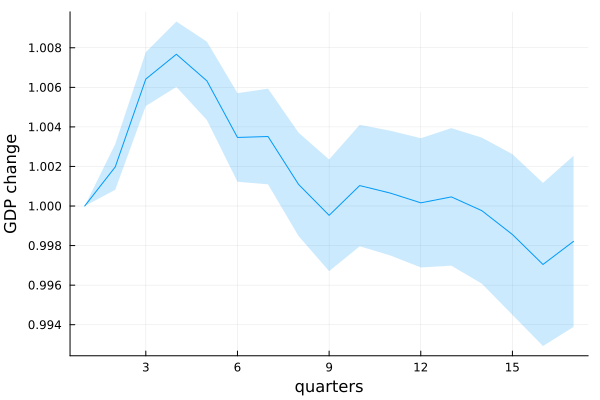
gdp_ratio = mean_gdp_shocked ./ mean_gdp_baseline17×1 Matrix{Float64}:
1.0
1.00197751433247
1.0064188356978914
1.0076724386056226
1.0063253040246205
1.0034667866156644
1.003513924302018
1.0010928891748752
0.9995287306684489
1.0010336813465832
1.00065416993328
1.0001613246729497
1.0004612676626683
0.9997632859274981
0.9985581637228943
0.9970447648679909
0.998214987811857the standard error on a ratio of two variables is computed with the error propagation formula
sem_gdp_ratio = gdp_ratio .* ((sem_gdp_baseline ./ mean_gdp_baseline) .^ 2 .+ (sem_gdp_shocked ./ mean_gdp_shocked) .^ 2) .^ 0.517×1 Matrix{Float64}:
0.0
0.0011573148183908347
0.0013602296625121967
0.0016536028798078176
0.0019819584293217386
0.0022409826731188357
0.002419469207140632
0.0026134758223838634
0.002823205224175922
0.003070677850807416
0.0031533028223117575
0.003267408321790742
0.0034767808852597913
0.003692536455881959
0.004062152125176088
0.004124812135432758
0.00432589256460368Finally, we can plot the impulse response curve
plot(
    1:(T + 1),
    gdp_ratio,
    ribbon = sem_gdp_ratio,
    fillalpha = 0.2,
    label = "",
    xlabel = "quarters",
    ylabel = "GDP change",
)
We can save the figure using: savefig("gdp_shock.png")